Calendar App Timeline View
See your day hour-by-hour in chronological detail


See your day hour-by-hour in chronological detail
A calendar app timeline view displays your entire day chronologically, hour by hour. See exactly where your events fit and identify free time slots instantly.
See your day broken down by hours with events positioned accurately.
Identify time gaps for new events or breaks.
See how your day is distributed across work, personal, and free time.
Drag and drop events to adjust timing.
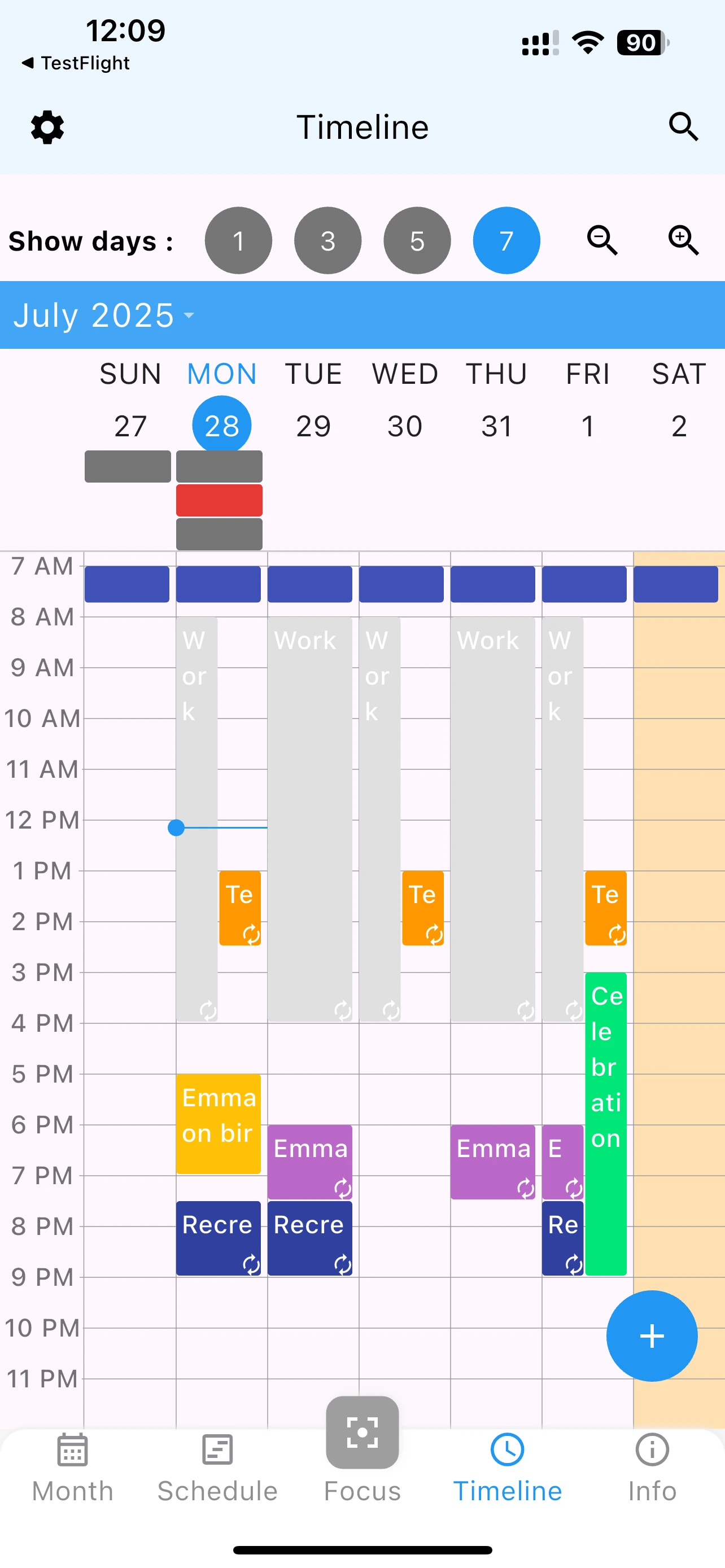
A calendar app timeline view provides a level of detail that month or week views can't offer. Perfect for professionals, students, and anyone managing a busy schedule.
Manage back-to-back meetings, client calls, and project work with precision. Timeline view shows exactly how meetings are stacked.
Balance classes, study sessions, and social events. See how much free time remains for studying.
View patient appointments throughout the day. Manage breaks and transition time between appointments.
Master your daily schedule with detailed timeline view
Yes, 365 Calendar offers multiple views: Focus, Month, Schedule, and Timeline. Switch between them anytime.
No, it's useful for any day with multiple events. See your entire day at a glance.
Yes, tap any event to edit details or drag to reschedule to a different time.