✨ 2-in-1 Productivity Solution
Calendar App with Task Manager Free
Stop switching apps - Manage your calendar and tasks in one place, completely free


Stop switching apps - Manage your calendar and tasks in one place, completely free
Most people use separate apps for their calendar and task management, constantly switching between them throughout the day. This fragmented workflow hurts productivity and makes it easy to miss important deadlines.
A calendar app with task manager free solution solves this by putting everything in one place. See your meetings alongside your to-do lists, understand your complete daily workload at a glance, and never let tasks slip through the cracks because they weren't on your calendar.
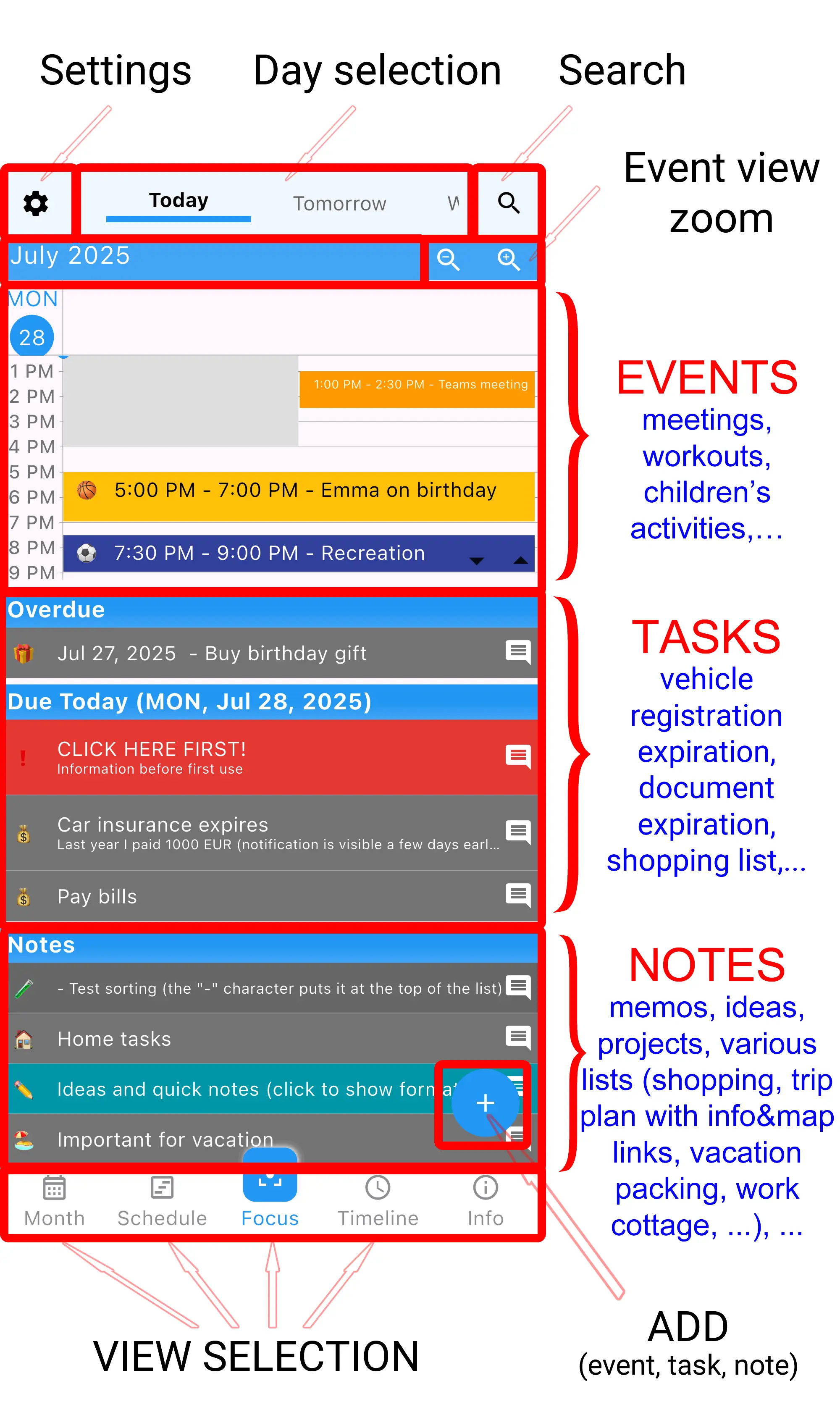
365 Calendar & Tasks is the only free calendar app that shows events, tasks, and notes together in one screen
See your meetings and appointments
See to-dos for today
Organize around both
Nothing gets missed
Create events with times, set reminders, add recurring appointments. Everything you expect from a calendar.
Create tasks with deadlines, set priorities, add subtasks. Powerful task management built-in.
Add notes without dates for ideas and shopping lists. Always visible when you need them.
See everything for today on one screen. Events on top, tasks below, notes at the bottom.
Set multiple alarms for both events and tasks. Never miss important deadlines.
Organize with colors and icons. Visually separate work, personal, family activities.
Set up repeating events and tasks. Weekly meetings, daily habits, monthly bills.
Full functionality without internet. This calendar with task manager works anywhere.
No premium features locked behind paywalls. Everything free forever.
Get the only free calendar app with integrated task manager - Download now
Start your day by opening the Focus view. You'll immediately see:
This unified view helps you plan your day effectively, scheduling task time around your calendar commitments.
As you complete tasks, check them off in the same app where you see your next meeting. When unexpected tasks arise, add them instantly without switching apps. The calendar app with task manager free design keeps you in one productive flow.
Review tomorrow by toggling the Focus view to the next day. Move incomplete tasks to tomorrow, add new events, prepare for upcoming deadlines - all in the same interface.
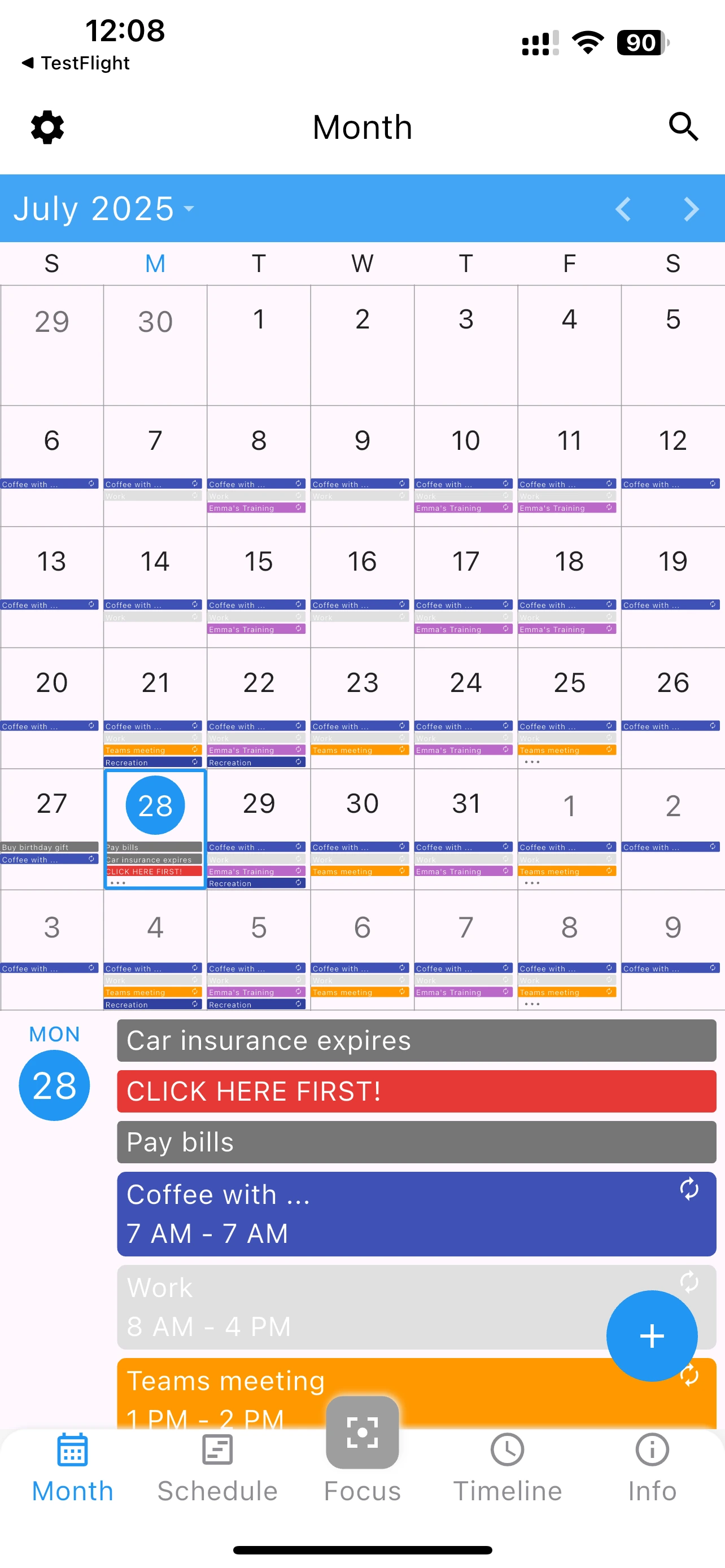
Balance meetings and projects in one view. See when you have time for deep work between calendar commitments.
Track class schedules alongside homework deadlines. See exam dates and assignment to-dos together.
Manage family events and household tasks in one place. Kids' activities + grocery lists + appointments.
Track client meetings and project tasks together. See billable time alongside deliverable deadlines.
Yes, 365 Calendar & Tasks is 100% free with no subscriptions, premium tiers, or locked features. Unlike apps like Todoist or TickTick that require paid plans for advanced features, everything here is free forever.
While Google offers both, they're separate apps with no unified view. Our calendar app with task manager shows everything together on one screen, making it easier to plan your day holistically.
Yes, the app can display events from Google Calendar when connected to internet. You can manually migrate tasks or start fresh with a clean slate.
Yes, you can create complex task hierarchies with subtasks, set priorities, add deadlines, attach notes, and organize with colors and icons.
Currently, the app focuses on personal productivity. Each user has their own local data for privacy. Cloud collaboration features may come in future updates.
Yes, this free calendar app with task manager is available on both iOS (iPhone/iPad) and Android devices with identical features.
No ads whatsoever. The app is completely ad-free, providing a clean and distraction-free experience for managing your schedule and tasks.
Absolutely. This calendar app with task manager works 100% offline. All features are available without internet connection, with optional cloud backup when you want it.
"Finally! A calendar app with task manager that's actually free. I was paying $10/month for TickTick before this." - Sarah M.
"The Focus view changed how I work. Seeing my meetings and to-dos together helps me plan my day so much better." - Michael K.
"I used to switch between Google Calendar and Todoist 50+ times a day. This all-in-one app is a game changer." - Jennifer L.
Download the best free calendar app with task manager today