Simple Offline Calendar App
The easiest way to manage your schedule without internet - Free, Simple, Offline


The easiest way to manage your schedule without internet - Free, Simple, Offline
A simple offline calendar app is a calendar application that focuses on essential features without complexity. Unlike complicated scheduling tools with dozens of features you'll never use, a simple offline calendar app gives you exactly what you need: an easy way to view and manage your schedule without requiring an internet connection.
When searching for a simple offline calendar app, users typically want three things: ease of use, offline functionality, and no unnecessary complications. 365 Calendar & Tasks delivers all three while remaining completely free and ad-free.
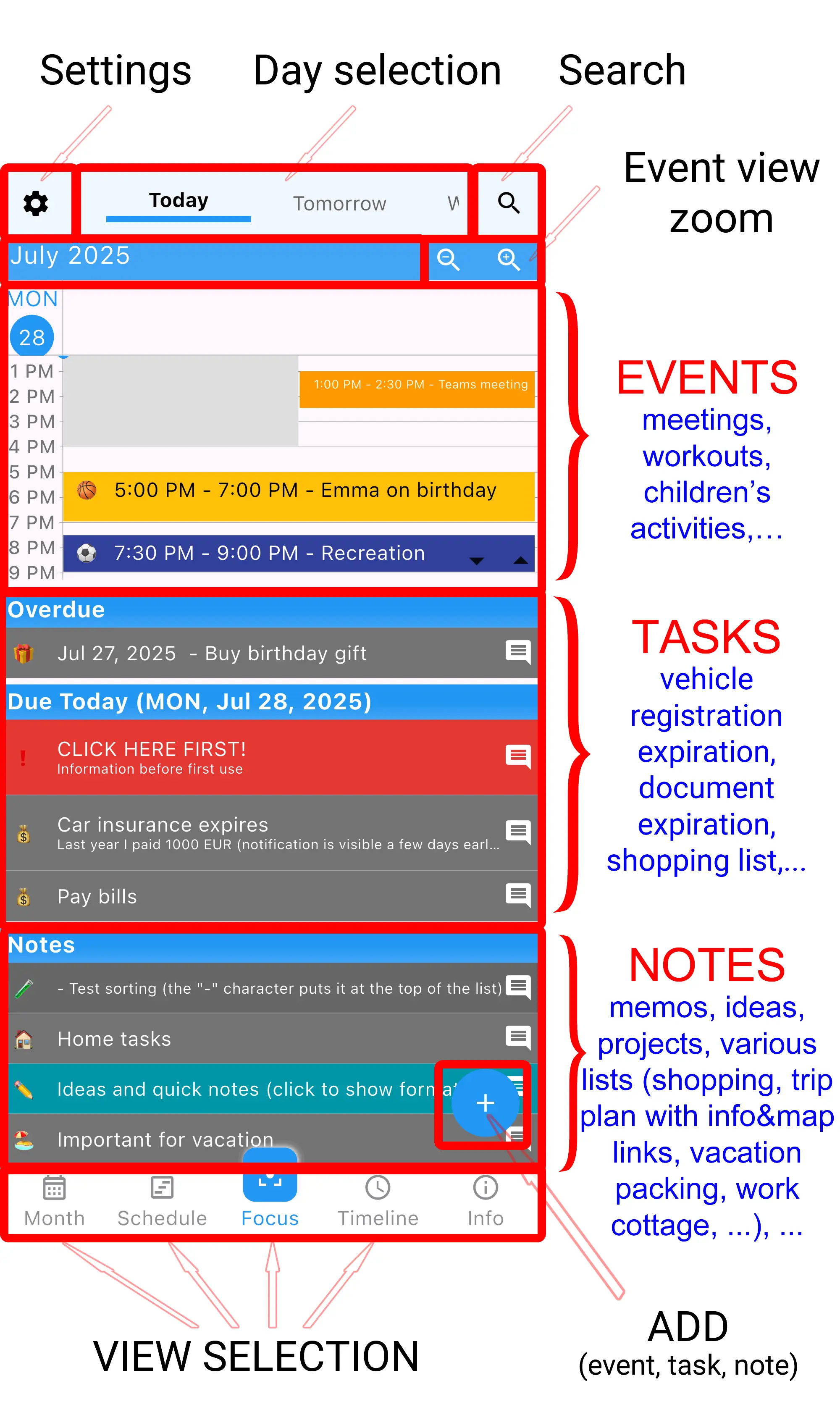
Start using it immediately without tutorials or complicated setup. A truly simple offline calendar app should be intuitive from the first use.
Access your schedule anytime, anywhere - on flights, in remote areas, or underground. No internet required.
Open instantly without waiting for cloud sync or loading screens. Your data is right on your device.
Your schedule stays on your phone. No account required, no data collection, complete privacy control.
See everything you need for today on one screen - events, tasks, and notes all together.
No hidden costs, no premium features, no subscription required. 100% free with zero advertisements.
Finding a truly simple offline calendar app can be challenging. Most calendar apps either require constant internet connectivity or overwhelm users with unnecessary features. 365 Calendar & Tasks takes a different approach - simplicity without sacrificing functionality.
One-Screen Simplicity: The Focus view shows everything you need for today on a single screen. No switching between apps, no endless tapping through menus. Events, tasks, and notes are all visible at once.
No Learning Curve: Unlike complex productivity tools that require hours of tutorials, this simple offline calendar app works intuitively. If you can use a smartphone, you can use this calendar.
Offline by Design: While many apps claim offline functionality, this simple offline calendar app was built offline-first. Everything works without internet - creating events, managing tasks, setting reminders, and viewing your schedule.
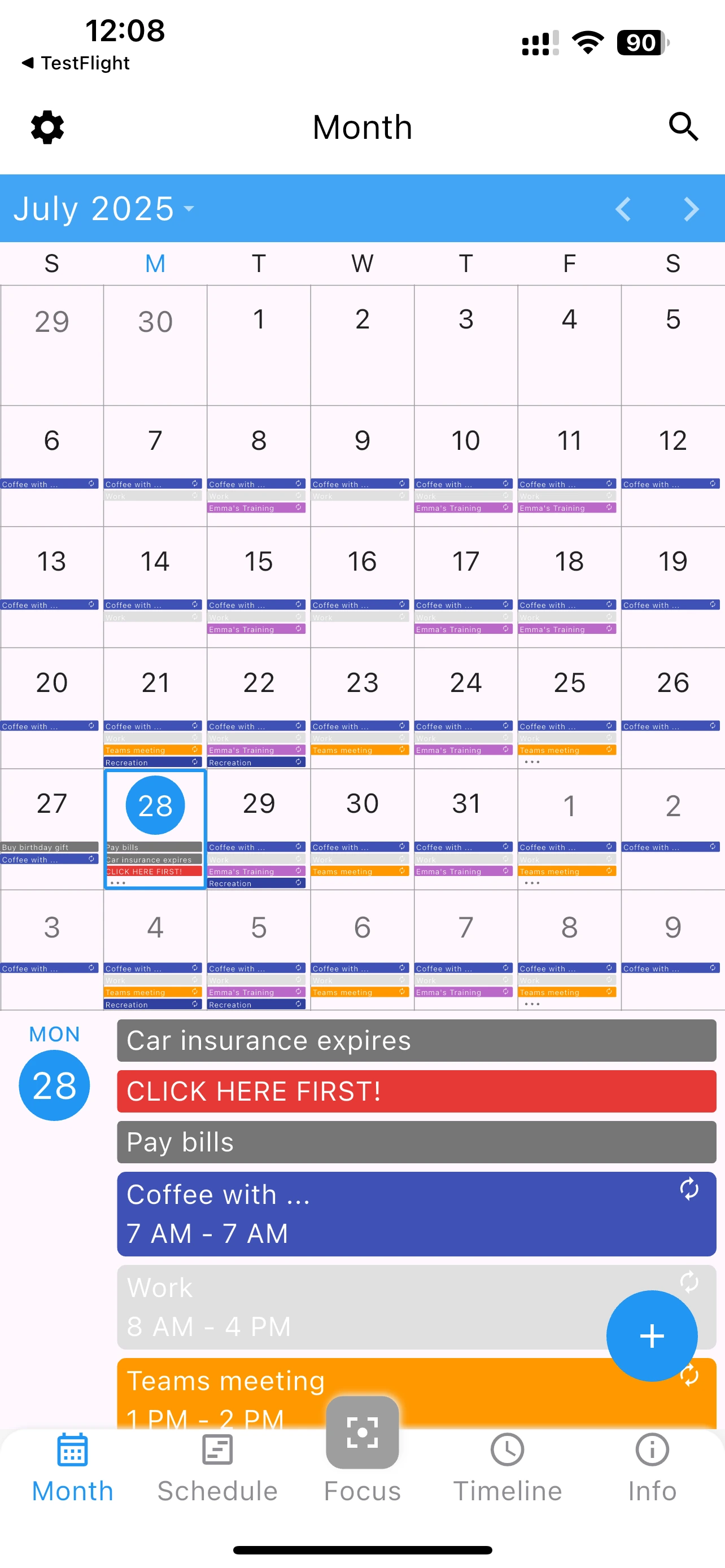
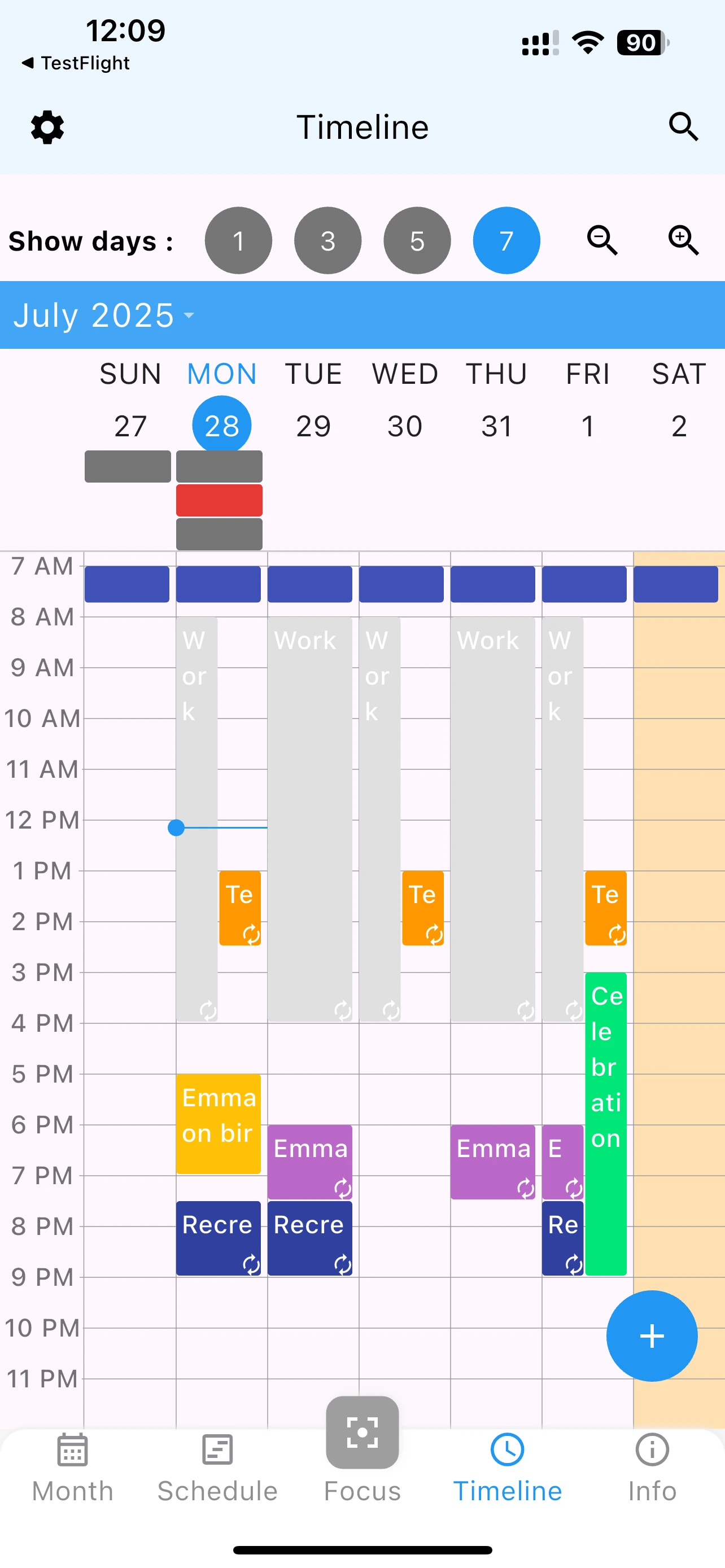
Events are scheduled activities with specific dates and times. Examples include meetings, appointments, or deadlines. In this simple offline calendar app, events are easy to create and manage - just tap, enter details, and save.
Tasks are things you need to do but aren't tied to specific times. They stay visible until you complete them. Perfect for shopping lists, errands, or ongoing projects. This simple offline calendar app lets you see tasks alongside your calendar events.
Notes are quick thoughts or reminders without dates. They're always visible at the bottom of your task list. Use them for ideas, grocery lists, or anything you want to remember.
Download the most simple offline calendar app today - completely free, no ads, works offline
Scan to download on your phone:

Not all calendar apps prioritize simplicity. Here's how a truly simple offline calendar app differs from complex alternatives:
| Feature | Simple Offline Calendar App | Complex Calendar Apps |
|---|---|---|
| Learning Time | ✓ Instant use | Hours of tutorials |
| Internet Required | ✓ Works offline | Needs connection |
| Interface | ✓ Clean & clear | Cluttered menus |
| Speed | ✓ Instant loading | Slow sync delays |
| Cost | ✓ Free forever | Premium required |
| Advertisements | ✓ Zero ads | Frequent interruptions |
When you're on international flights or in areas with limited connectivity, a simple offline calendar app ensures you always have access to your schedule. No roaming charges, no connection issues - just your calendar when you need it.
If you're concerned about cloud services accessing your personal schedule, a simple offline calendar app keeps everything on your device. Your appointments, meetings, and personal notes stay private.
Complicated apps with dozens of features can be overwhelming. A simple offline calendar app with large fonts and straightforward navigation makes scheduling accessible to everyone, regardless of tech skills.
Sometimes less is more. If you want a calendar that does its job without unnecessary features, social integrations, or complex workflows, a simple offline calendar app is the perfect solution.
Working from remote locations often means unreliable internet. A simple offline calendar app ensures your productivity tools work regardless of connection quality.
This simple offline calendar app includes essential features without the bloat:
Every feature serves a purpose. Nothing is added just to pad the feature list. That's what makes this a truly simple offline calendar app.
A simple offline calendar app is a calendar application that works without internet connection and focuses on essential scheduling features without unnecessary complexity. It allows you to view, create, and manage events offline on your mobile device.
Yes, 365 Calendar & Tasks is a true offline calendar. You can create, edit, view, and manage all events, tasks, and reminders without any internet connection. Your data is stored locally on your device.
Absolutely. This simple offline calendar app is 100% free with no premium features, subscriptions, or in-app purchases. You get full functionality at no cost.
No. Unlike many free calendar apps, this simple offline calendar app contains zero advertisements. You get a clean, distraction-free experience.
Yes, the app includes optional cloud backup that you can use when internet is available. However, sync is not required - the app works perfectly offline on a single device.
Yes, this simple offline calendar app is available on both iOS (iPhone and iPad) and Android devices. Download from the App Store or Google Play.
Google Calendar requires internet for most functions and syncs everything to the cloud. This simple offline calendar app works completely offline, stores data locally for better privacy, and offers a simpler interface focused on essential features.
Yes, this simple offline calendar app combines calendar events with task management in one unified view. You can see your schedule and to-do list together without switching apps.
In an age of increasingly complex software, the value of a simple offline calendar app cannot be overstated. Here's why simplicity is essential:
Every additional feature, button, or menu option requires mental energy to process. A simple offline calendar app reduces this cognitive burden, letting you focus on your schedule instead of learning the software.
When you need to quickly check your schedule or add an event, complexity slows you down. A simple offline calendar app gets out of your way, letting you accomplish tasks in seconds instead of minutes.
Not everyone is tech-savvy. A simple offline calendar app serves users of all ages and technical abilities. Your grandmother should find it as easy to use as a tech professional.
Complex systems have more points of failure. A simple offline calendar app with focused features is inherently more stable and reliable. Fewer features mean fewer bugs and better performance.
Join thousands of users who've simplified their scheduling with the easiest offline calendar app
Download 365 Calendar & Tasks from the App Store (iOS) or Google Play (Android). Installation takes just seconds, and the app is lightweight - under 20MB.
No account creation required. Open the app and you'll immediately see the Focus view. This is your command center - everything you need for today in one place.
Tap the plus button, enter event details, and save. It's that simple. Your event appears immediately in the appropriate view.
While the default settings work great, you can customize colors, font size, and view preferences in Settings. But even without customization, this simple offline calendar app works perfectly out of the box.
Turn off your internet and notice nothing changes. Your simple offline calendar app continues working exactly as before - because it was designed to work offline from day one.
"I've tried dozens of calendar apps, and this is by far the simplest and most reliable. Works perfectly on flights when I'm planning my week." - Steve S. ⭐⭐⭐⭐⭐
"Finally a calendar app my dad can actually use! Simple enough for seniors but powerful enough for everyone." - AAA ⭐⭐⭐⭐⭐
"Love that it works offline. I travel to remote areas for work, and this is the only calendar app I trust." - Ted G. ⭐⭐⭐⭐⭐
In a world of overcomplicated software, finding a truly simple offline calendar app is refreshing. 365 Calendar & Tasks proves that calendar apps don't need dozens of features, cloud requirements, or complex interfaces to be effective.
Whether you're looking for a simple offline calendar app for travel, privacy, ease of use, or just prefer keeping things straightforward, this app delivers on all fronts. It's free, ad-free, works completely offline, and focuses on doing one thing exceptionally well: helping you manage your schedule with minimal friction.
Download this simple offline calendar app today and experience the difference that simplicity makes in your daily planning and productivity.
Before you leave, download the simplest offline calendar app - 100% free, zero ads